![AIM-logo-white.png]](https://support.theaiminstitute.com/hs-fs/hubfs/AIM-logo-white.png?height=40&name=AIM-logo-white.png)
On a Windows 10 PC
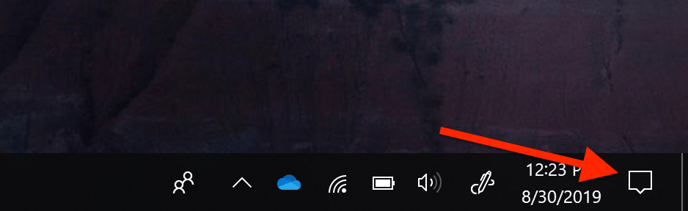
1) Click the notifications icon at the bottom right of the Windows task bar.
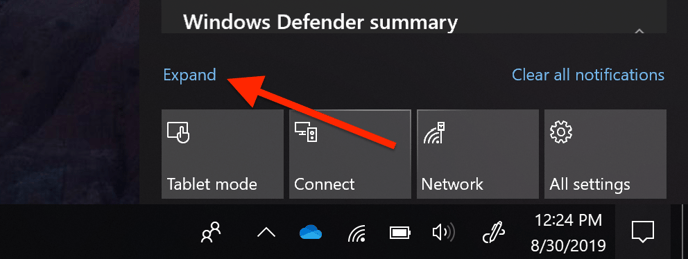
2) If you only see 1 row of square icons, click the "Expand" link to display them all. If you see the word "Collapse" where the word "Expand is in the image below, then skip this step.
3) Click the "Airplane mode" button. It will flash a color and then stay that color to indicate that it is turned on.
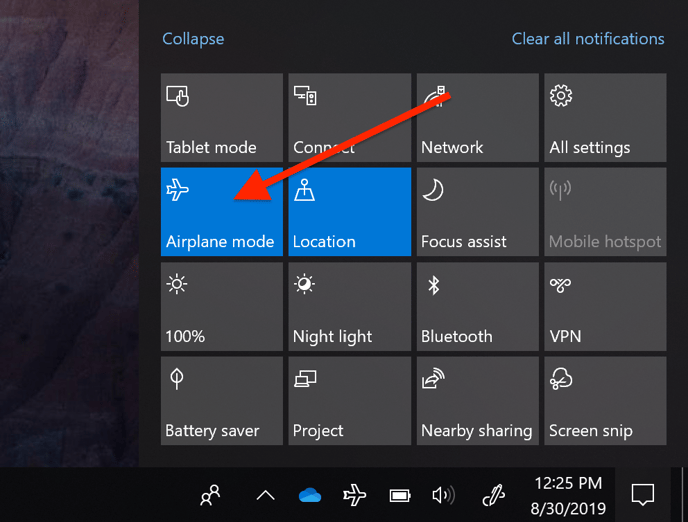
You are now disconnected from the internet.
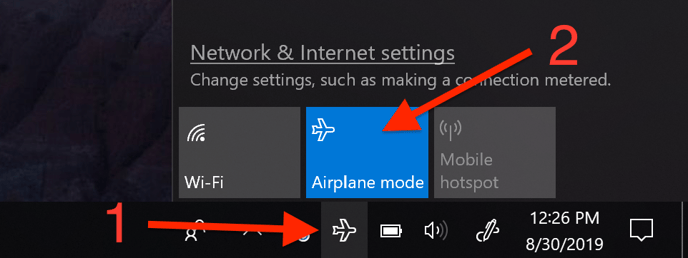
Don't forget to turn it back on again to sync your data. To turn it back on, click the airplane icon in the task tray and then toggle the "Airplane mode" button.
On a Mac
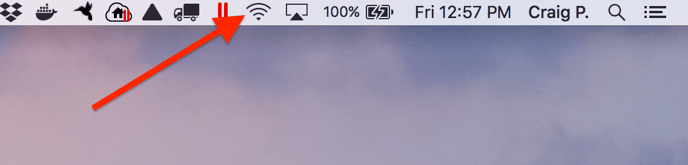
1) Click the Wi-Fi icon in the top bar of your screen.
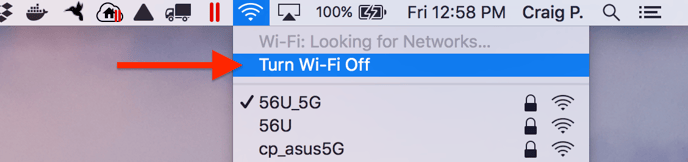
2) Click "Turn off Wi-Fi" in dropdown that opens up.
You are now disconnected from the internet.
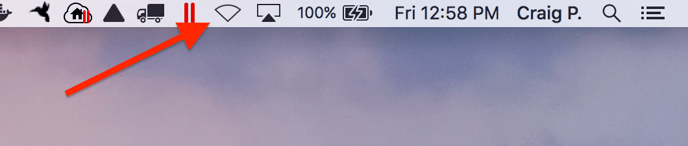
Don't forget to turn it back on again and sync as soon as possible. To turn it back on, just repeat the steps above and select "Turn on Wi-Fi".