![AIM-logo-white.png]](https://support.theaiminstitute.com/hs-fs/hubfs/AIM-logo-white.png?height=40&name=AIM-logo-white.png)
What is the Executive Dashboard?
Your business leaders have access to an Executive Dashboard, where they can see the progress of all Blueprinter projects:
- What step it is in (Market Research, Discovery, Preference, etc).
- How many interviews have been completed... and scheduled.
- When you expect to complete your project's Market Case.
.jpg?width=688&height=319&name=Exec%20Dashboard%20Pipeline%20(with%20notes).jpg)
Here are the steps you should take to ensure your project is included:
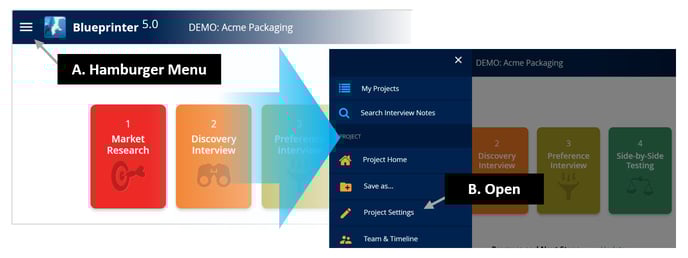
Step 1: Open Project Settings
Open your Blueprinter project, click the "hamburger menu" in the upper left, and click "Project Settings."
Step 2: Complete Project Settings
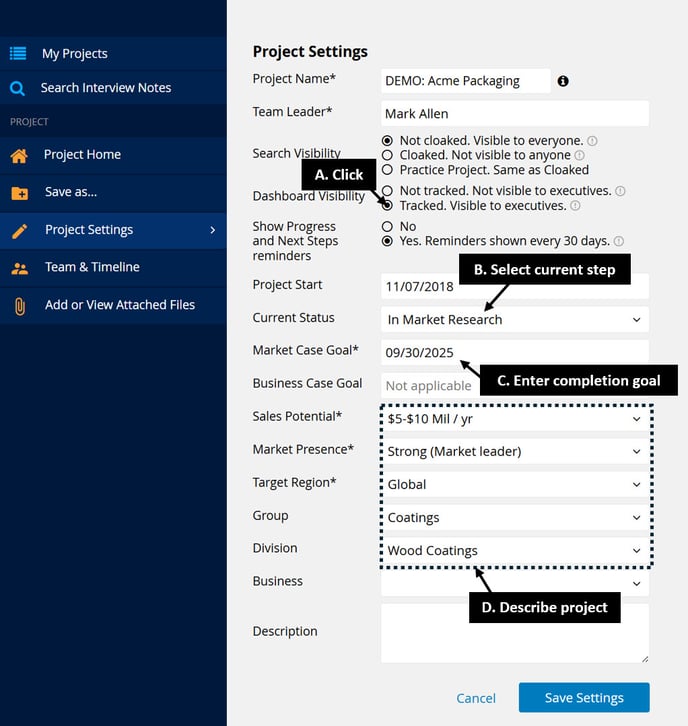
In the Project Settings window, complete the following:
- Click ""Tracked. Visible to executives"
- Select which Blueprinting Step your project is at.
- Enter your Market Case goal date. (You can change this later.)
- Complete the remaining fields to describe your project.
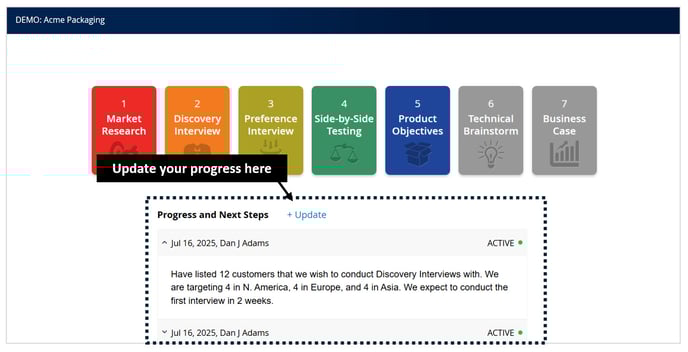
Step 3: Updates
Want to communicate more detail to your business leaders and/or those monitoring projects? Use the "update" field on your project's Home Page...
Keywords: Executive Dashboard, project update, Blueprinter, project settings, hamburger menu, Market Case, business leaders, progress update, tracked, Market Case goal.